Case Study: Redefining Remote Work for the Hybrid Era
Executive Summary
The shift to hybrid work created a fragmented toolset: Zoom for calls, Miro for brainstorming, Google Docs for writing, and Slack for chat. Context switching was killing productivity.
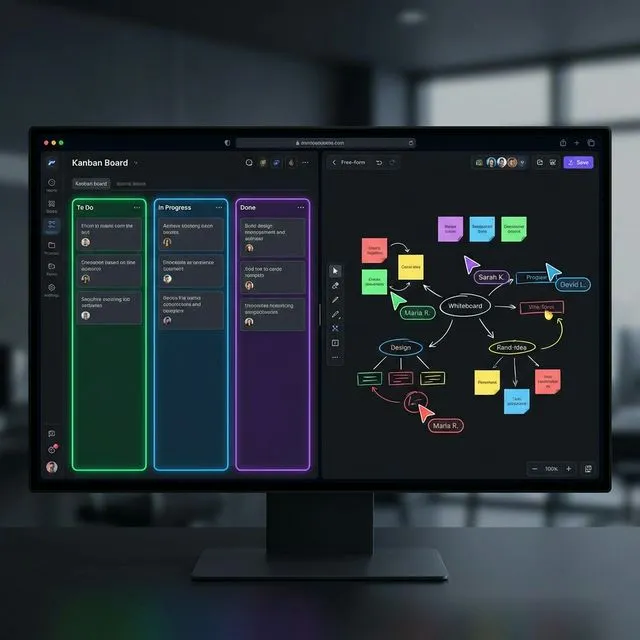
Our client, SyncSpace Inc., envisioned a unified platform where these modalities co-existed in a single, infinite canvas. They needed a solution that felt as responsive as a local application but synchronized state across thousands of users globally.
We built the SyncSpace Collaboration Suite, a real-time platform handling over 100,000 concurrent websocket connections with < 50ms latency. The launch was a massive success, onboarding 500 enterprise teams in the first month.
The Challenge
The "State Synchronization" Problem
Building a collaborative text editor is hard. Building a collaborative everything (canvas, text, video, code) is exponentially harder.
- Conflict Resolution: If User A draws a circle while User B deletes the canvas, who wins?
- Bandwidth: Streaming 4K video alongside high-frequency mouse movements and canvas updates requires aggressive bandwidth management.
Performance at Scale
The system needed to support "Town Hall" mode, where 500+ users could view a single board while 10+ presenters interacted with it simultaneously.
The Solution
We architected a high-performance system using Conflict-free Replicated Data Types (CRDTs) and a custom WebSocket edge network.
Core Technologies
1. CRDTs for State Management
We used Y.js, a high-performance CRDT library, to manage shared state:
import * as Y from 'yjs';
import { WebsocketProvider } from 'y-websocket';

const doc = new Y.Doc();
const provider = new WebsocketProvider(
  'wss://edge.syncspace.io',
  'room-id',
  doc
);

// Shared canvas elements
const elements = doc.getArray<CanvasElement>('canvas');

// Shared text documents
const textDoc = doc.getText('document');

// Observe remote changes
elements.observeDeep((events) => {
  events.forEach((event) => {
    if (event.target === elements) {
      renderCanvas(elements.toArray());
    }
  });
});

// Awareness protocol for cursors and presence
const awareness = provider.awareness;
awareness.setLocalState({
  user: { name: 'Giulio', color: '#3b82f6' },
  cursor: { x: 0, y: 0 },
});
- Decentralized Logic: CRDTs ensure that all users eventually converge to the same state, regardless of the order in which they receive updates. This allows for offline support; a user can work on a plane and sync when they land.
- Undo/Redo: Y.js provides built-in undo management that works correctly in a multi-user environment — each user's undo stack is independent.
2. WebSocket Edge Network
We deployed custom WebSocket servers written in Rust (using actix-web) to the edge using Cloudflare Workers:
use actix_web::{web, HttpRequest, HttpResponse};
use actix_ws::Message;

async fn ws_handler(
    req: HttpRequest,
    body: web::Payload,
    state: web::Data<AppState>,
) -> actix_web::Result<HttpResponse> {
    let (response, mut session, mut msg_stream) = actix_ws::handle(&req, body)?;

    let room_id = req.match_info().get("room").unwrap();
    let room = state.rooms.entry(room_id.to_string())
        .or_insert_with(Room::new);

    actix_web::rt::spawn(async move {
        while let Some(Ok(msg)) = msg_stream.next().await {
            match msg {
                Message::Binary(bytes) => {
                    // Y.js sync protocol
                    room.broadcast(bytes, &session).await;
                }
                Message::Ping(bytes) => {
                    session.pong(&bytes).await.ok();
                }
                _ => {}
            }
        }
    });

    Ok(response)
}
- Global Routing: Users connect to the nearest edge node. We use Cloudflare's Anycast network to route connections to the closest PoP, achieving < 20ms connection establishment.
- Pub/Sub: Redis Streams are used as a high-speed backplane to broadcast messages between edge nodes, with message deduplication via vector clocks.
3. Media Server Infrastructure
For video and audio, we implemented a Selective Forwarding Unit (SFU) using Mediasoup.
- Adaptive Bitrate: The video quality automatically adjusts based on the user's available bandwidth and CPU usage. We implemented three simulcast layers (360p, 720p, 1080p).
- Spatial Audio: Users hear others louder if their avatars are closer on the canvas, creating a natural "breakout room" effect without navigating menus.
User Interface: The Infinite Canvas
The frontend was built with React and WebGL (using PixiJS) for rendering the canvas:
class CanvasRenderer {
  private app: PIXI.Application;
  private viewport: Viewport;

  constructor(container: HTMLElement) {
    this.app = new PIXI.Application({
      resizeTo: container,
      antialias: true,
      backgroundAlpha: 0,
    });

    // Infinite scroll viewport with culling
    this.viewport = new Viewport({
      worldWidth: 100_000,
      worldHeight: 100_000,
      events: this.app.renderer.events,
    });

    this.viewport
      .drag()
      .pinch()
      .wheel()
      .decelerate();

    // Only render elements in the visible area
    this.viewport.on('moved', () => this.cullElements());
  }

  private cullElements(): void {
    const bounds = this.viewport.getVisibleBounds();
    this.elements.forEach((el) => {
      el.renderable = bounds.contains(el.x, el.y);
    });
  }
}
- Performance: DOM elements are too slow for thousands of sticky notes. We drop down to WebGL for rendering the board content, ensuring 60fps scrolling even on complex boards with 10,000+ elements.
- Presence: We implemented "smooth cursors" where raw mouse position updates (sent at 10Hz) are interpolated on the client side to look like 60Hz movement using cubic Bézier interpolation.
Impact & Results
SyncSpace has become the default tool for creative agencies and dev shops.
Performance Metrics
| Metric | Target | Achieved |
|---|---|---|
| Sync latency (p50) | < 100ms | 35ms |
| Sync latency (p99) | < 500ms | 120ms |
| Max concurrent users/room | 500 | 2,500 |
| Canvas render (10K elements) | 30fps | 58fps |
| Memory (1K elements) | < 200MB | 85MB |
| WebSocket reconnect | < 5s | 1.2s |
User Engagement
- Session Time: Average session length increased by 40% compared to using disparate tools.
- Retention: 95% month-over-month retention rate for enterprise accounts.
- NPS Score: 72 (vs industry average of 36 for collaboration tools).
Lessons Learned
- CRDTs are not a silver bullet — They handle text and arrays well, but complex structured data (like a Figma-style design tool) requires careful schema design. We spent 3 weeks refactoring our CRDT schema after discovering performance issues with deeply nested structures.
- WebSocket reconnection is UX-critical — Users don't notice a 200ms sync delay, but they absolutely notice a 5-second reconnection gap. We implemented exponential backoff with jitter and local operation buffering.
- Test with real network conditions — Our local tests showed 5ms latency. Production showed 200ms spikes during peak hours. Network simulation (using
tc netem) should be part of CI.
Future Roadmap
- AI Copilot: An integrated AI that listens to the voice conversation and automatically generates summary sticky notes and action items on the board.
- Plugin Architecture: Allowing third-party developers to build custom widgets (e.g., Jira integration, Figma embed) directly onto the canvas.
- E2E Encryption: Per-room encryption keys with key rotation for enterprise compliance.
Conclusion
SyncSpace proves that the browser is capable of desktop-class performance. By leveraging CRDTs and Edge Computing, we've built a collaboration tool that feels instant, natural, and invisible—getting out of the way so teams can flow.
Technologies Used: React, Rust, WebAssembly, Y.js (CRDTs), WebGL (PixiJS), Mediasoup (WebRTC), Redis, Cloudflare Workers.